
Is It Better to Buy or Lease a New Hybrid-Electric Vehicle?

With the shift toward cleaner transportation and rising fuel prices, hybrid-electric vehicles (HEVs) have surged in popularity. But when it comes to acquiring one, many car shoppers face the same dilemma: Should you buy or lease a new hybrid-electric vehicle? The answer isn’t universal — it depends on your finances, driving habits, and long-term goals.

Let’s break it down.


1. Understanding the Basics: Buy vs. Lease

Buying

  • You own the car outright (once payments are complete).

  • You can keep it as long as you want.

  • You can modify it.

  • You can sell it anytime.

Leasing

  • You essentially “rent” the vehicle for a fixed period (usually 2–4 years).

  • Monthly payments are typically lower.

  • You return the car at lease end.


2. Pros and Cons: Buying a Hybrid

Advantages of Buying

✅ Long-Term Value – After you finish payments, you own an eco-friendly car with continued fuel savings.
✅ No Mileage Limits – Many leases impose mileage caps; ownership gives freedom to drive as much as you want.
✅ Resale & Trade-In Value – Hybrids tend to hold value well due to fuel efficiency demand.
✅ Customization – You can install accessories or upgrades without restrictions.

Disadvantages of Buying

❌ Higher Monthly Payments – Buying typically means bigger monthly loans compared to leasing.
❌ Depreciation Risk – Hybrids depreciate like other cars; resale value fluctuates with tech advances.
❌ Maintenance Costs Over Time – Once warranties expire, repairs can add up.


3. Pros and Cons: Leasing a Hybrid

Advantages of Leasing

✅ Lower Monthly Payments – Leasing often costs less per month than financing a purchase.
✅ Drive New Tech More Often – Hybrids and electrified tech are improving fast — leasing lets you upgrade every few years.
✅ Warranty Coverage – Many leases align with the manufacturer warranty, lowering unexpected costs.
✅ Tax/Business Benefits – For business owners, lease expenses may be deductible (subject to local tax law).

Disadvantages of Leasing

❌ Mileage Restrictions – Exceeding limits leads to hefty fees.
❌ No Ownership Equity – You never own the vehicle.
❌ Wear and Tear Fees – You may pay for excess wear at lease end.
❌ Customizations Limited – You can’t modify the car freely.


4. How Hybrids Change the Equation

Hybrid-electric vehicles add another layer to the decision:

Better Fuel Efficiency

Hybrids save money at the pump — a perk whether you buy or lease.

Resale Value

Because demand for fuel-efficient cars remains strong, many hybrids retain value better than conventional cars — making buying more attractive if you plan to keep the car long term.

Battery Lifespan Concerns

Most hybrids have long battery warranties (often 8–10 years). If the warranty aligns with your purchase term, buying becomes less risky. Leasing also shifts battery concerns to the manufacturer, but technology is advancing, reducing degradation anxiety for owners.


5. When Buying Makes Sense

Consider buying a hybrid if:

✔ You drive high annual miles
✔ You want full ownership and freedom
✔ You plan to keep the vehicle for 5+ years
✔ You’re focused on long-term savings


6. When Leasing Makes Sense

Leasing might be better if:

✔ You like new technology every few years
✔ You want lower monthly payments
✔ You drive moderate miles
✔ You prefer minimal repair risk


7. Financial Snapshot: Buy vs. Lease

Factor Buying Leasing
Monthly Payments Higher Lower
Ownership Yes No
Mileage Limit No Yes
Customization Yes No
Long-Term Cost Often Lower Often Higher

8. Real-World Example (Illustrative)

Scenario:

  • New hybrid priced at ₹30 lakh

  • Loan vs. 3-year lease

Buying:

  • Higher payments

  • After 6 years, no loan & still in use

  • Fuel savings for years

Leasing:

  • Lower payments for 3 years

  • Return and upgrade to newer model

  • No resale value

Outcome:
Buying tends to be more cost-effective long term, while leasing gives flexibility and lower initial costs.


9. Tips Before You Decide

✅ Calculate total cost of ownership — include financing, fuel, maintenance, and resale.
✅ Check incentives — sometimes hybrids have tax credits or manufacturer perks.
✅ Review mileage patterns — exceed lease limits and your savings vanish.
✅ Check warranties — battery and hybrid system warranties reduce risk.


10. Final Verdict: What’s Better?

There’s no one-size-fits-all answer, but here’s a simple rule:

🟢 Buy if you want long-term value, high mileage flexibility, and eventual equity.
🟡 Lease if you prefer lower payments, new tech often, and minimal long-term commitment.

Both can be smart choices — the right one depends on your lifestyle and financial goals.

Is Bank DSA Business Profitable? A Clear Guide for Beginners

If you’re exploring business opportunities in the financial sector, you may have come across the term Bank DSA (Direct Selling Agent). It’s a popular side business in India—especially for those interested in finance, sales, or entrepreneurship. But the big question is: Is a bank DSA business profitable? Let’s break it down.


What Is a Bank DSA?

A Direct Selling Agent (DSA) is an individual or company that works with banks or financial institutions to generate loan or financial product leads. Instead of the bank doing all the sales work, they partner with DSAs who bring in potential borrowers. In return, DSAs earn commissions from the bank.

DSAs typically help with products such as:

  • Personal loans

  • Home loans

  • Business loans

  • Credit cards

  • Car loans

The bank pays the DSA a commission for every successful customer they bring in.


How Do DSAs Make Money?

DSA income comes mainly from commissions and incentives paid by the bank. These can vary based on:

  • Type of loan or financial product

  • Loan amount and tenure

  • Bank/financial institution policies

  • Performance incentives tied to targets

For example, a DSA might earn:

  • A fixed fee per loan approval

  • A percentage of the loan amount

  • Higher payouts for high-value loans

  • Bonus payouts for meeting monthly targets

The more quality leads you convert, the more you can earn.


Why a DSA Business Can Be Profitable

Here’s why many people find the DSA business lucrative:

1. Low Startup Costs

Starting as a DSA doesn’t require heavy investment. You need:

  • A computer and phone

  • Internet connection

  • Basic marketing skills

  • Bank affiliation

There’s no need for inventory or a physical store.

2. High Earning Potential

If you generate consistent leads and build relationships, your commission earnings can increase significantly over time. Experienced DSAs who handle multiple products and clients often earn substantial monthly incomes.

3. Flexible Work

As a DSA, you can work part-time, full-time, or alongside another job. It’s ideal for:

  • Students

  • Freelancers

  • Sales professionals

  • Entrepreneurs

Flexibility makes it a popular choice.

4. Recurring Income Opportunity

Some banks offer recurring commissions for repeat business or customer referrals, enabling long-term income potential.


Challenges and What to Watch Out For

While the DSA business can be profitable, it’s not without challenges:

1. Competition Is Tough

Many DSAs operate in the same regions, so differentiating yourself and generating quality leads is essential.

2. Income Isn’t Guaranteed

You only earn when loans get approved. Customer finance history, documentation issues, or bank policies can delay or deny approvals.

3. Requires Good Networking Skills

You must build trust, communicate effectively, and stay updated on financial products to succeed.

4. Regulations and Compliance

Banks may require background verification and compliance with policies. DSAs should be professional and ethical in their operations.


Tips to Succeed as a DSA

If you’re considering this path, here are some practical tips:

  • Learn financial products deeply: Understand loan types, interest rates, and documentation processes.

  • Build a strong network: Focus on referrals from family, friends, existing clients, and businesses.

  • Offer value to clients: Help customers with paperwork, eligibility queries, and bank procedures.

  • Use online marketing: Social media, blogs, and local business listings can attract new leads.

  • Partner with multiple banks: Diversifying products increases earning potential.


So, Is It Really Profitable?

Yes—bank DSA business can be profitable, especially if you:
✅ Generate steady leads
✅ Build trust with customers and banks
✅ Scale business through marketing and referrals
✅ Manage compliance professionally

Income can vary widely—some part-time DSAs earn modest supplementary income, while full-time professionals can make substantial monthly earnings.


Final Thoughts

The bank DSA business offers an accessible entry point into the financial services world with low costs and flexible working options. However, it demands excellent communication skills, persistence, and ethical practice. If you’re willing to put in the effort and learn the market, it can be a rewarding and profitable business.

How Could I Learn Embedded Systems on My Own?

Learning embedded systems on your own may seem challenging at first, but with the right roadmap, tools, and mindset, it is absolutely achievable. Embedded systems are everywhere—from washing machines and cars to medical devices and IoT gadgets—making this field both exciting and future-proof. If you’re motivated to self-learn, here’s a clear and practical guide to get you started.


What Is an Embedded System?

https://www.researchgate.net/publication/349816355/figure/fig1/AS%3A997983579545604%401614949235878/Basic-block-diagram-of-an-embedded-system.png?utm_source=chatgpt.com
https://i.ytimg.com/vi/EivQhlNdy4w/hq720.jpg?rs=AOn4CLBuxMMFB9h0NPj47tKeP3GBozNOrw&sqp=-oaymwEhCK4FEIIDSFryq4qpAxMIARUAAAAAGAElAADIQj0AgKJD&utm_source=chatgpt.com

An embedded system is a combination of hardware and software designed to perform a specific task. It usually consists of a microcontroller or microprocessor, memory, input/output devices, and firmware written in low-level programming languages.


Step 1: Build a Strong Electronics Foundation

Before diving deep, it’s important to understand basic electronics concepts such as:

  • Voltage, current, and resistance

  • Capacitors, resistors, diodes, and transistors

  • Digital logic (AND, OR, NOT gates)

  • Power supplies and basic circuit diagrams

You don’t need to be an electronics expert, but a basic understanding will make learning embedded systems much easier.


Step 2: Learn C Programming (Very Important)

C is the backbone of embedded systems programming. Focus on:

  • Variables, data types, and pointers

  • Bitwise operations

  • Memory management

  • Functions and structures

  • Writing efficient and optimized code

Once you are comfortable with C, learning embedded concepts becomes much smoother.


Step 3: Understand Microcontrollers

Start with beginner-friendly microcontrollers such as:

  • Arduino (ATmega328) – great for beginners

  • 8051 – useful for understanding fundamentals

  • ARM Cortex-M – widely used in industry

Learn how microcontrollers work internally, including registers, GPIO pins, timers, ADCs, and interrupts.


Step 4: Get Hands-On with Hardware

Embedded systems cannot be mastered without practice. Buy a basic development board and start experimenting:

  • Blink an LED

  • Read sensor data (temperature, motion, light)

  • Control motors and displays

  • Use buttons, buzzers, and relays

Hands-on projects help you understand how software interacts with hardware in real time.


Step 5: Learn Embedded Communication Protocols

Modern embedded systems communicate with other devices. Learn common protocols such as:

  • UART

  • SPI

  • I2C

  • CAN (important for automotive systems)

Understanding communication protocols is crucial for real-world embedded applications.


Step 6: Explore Embedded Operating Systems

Once you’re comfortable with bare-metal programming, move to embedded operating systems:

  • Learn RTOS (Real-Time Operating Systems) basics

  • Understand tasks, scheduling, semaphores, and interrupts

  • Explore FreeRTOS for practical experience

RTOS knowledge is highly valued in industrial embedded roles.


Step 7: Work on Real-World Projects

Projects are the best way to prove your skills. Try building:

  • Smart home automation systems

  • IoT-based weather monitoring

  • Digital clocks or smart meters

  • Robotics or automation projects

Document your projects and share them on GitHub or a personal blog to build a strong portfolio.


Step 8: Learn Debugging and Testing

Debugging is a critical embedded skill. Learn to use:

  • Serial monitors

  • Logic analyzers

  • Debuggers like JTAG or SWD

  • Datasheets and reference manuals

Reading datasheets may feel difficult initially, but it’s a must-have skill for embedded engineers.


Step 9: Use Online Resources Wisely

There are plenty of free and paid resources available:

  • YouTube tutorials and embedded blogs

  • Open-source embedded projects

  • Forums and developer communities

  • Official documentation from microcontroller manufacturers

Consistency matters more than the number of resources you follow.


Step 10: Stay Patient and Consistent

Embedded systems have a steep learning curve, especially when you’re learning on your own. Break topics into small goals, practice daily, and don’t get discouraged by early failures. Every bug you fix makes you a better embedded engineer.


Final Thoughts

So, can you learn embedded systems on your own? Yes, absolutely. With basic electronics knowledge, C programming skills, hands-on practice, and real-world projects, you can build a solid foundation without formal classroom training.

Does Learning Cloud Computing Help Me in My Career?

In today’s digital-first world, cloud computing has become the backbone of modern technology. From startups to global enterprises, organizations rely heavily on cloud platforms to store data, deploy applications, and scale their businesses. This raises an important question for students and professionals alike: does learning cloud computing really help in building a successful career? The short answer is yes—and here’s why.


What Is Cloud Computing?

https://media.geeksforgeeks.org/wp-content/uploads/20210318074917/archcloud2.png?utm_source=chatgpt.com
https://www.stackscale.com/wp-content/uploads/2020/04/cloud-service-models-iaas-paas-saas-stackscale.jpg?utm_source=chatgpt.com
https://media.geeksforgeeks.org/wp-content/uploads/20211123123930/Group2-660x330.jpg?utm_source=chatgpt.com
4

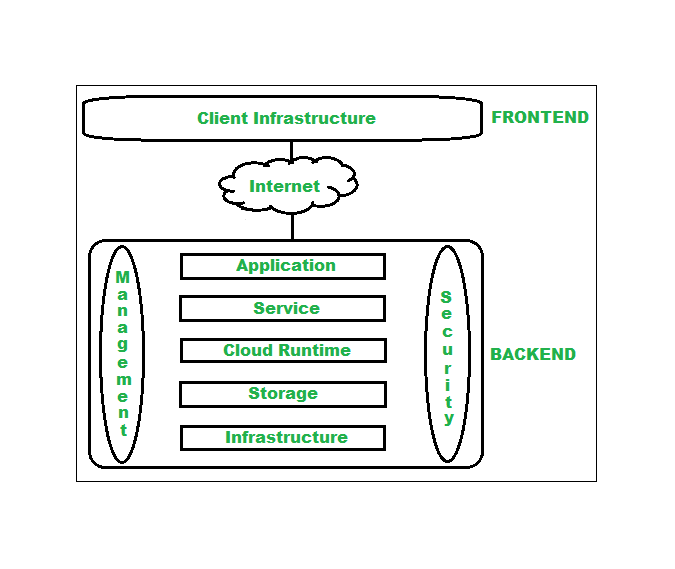
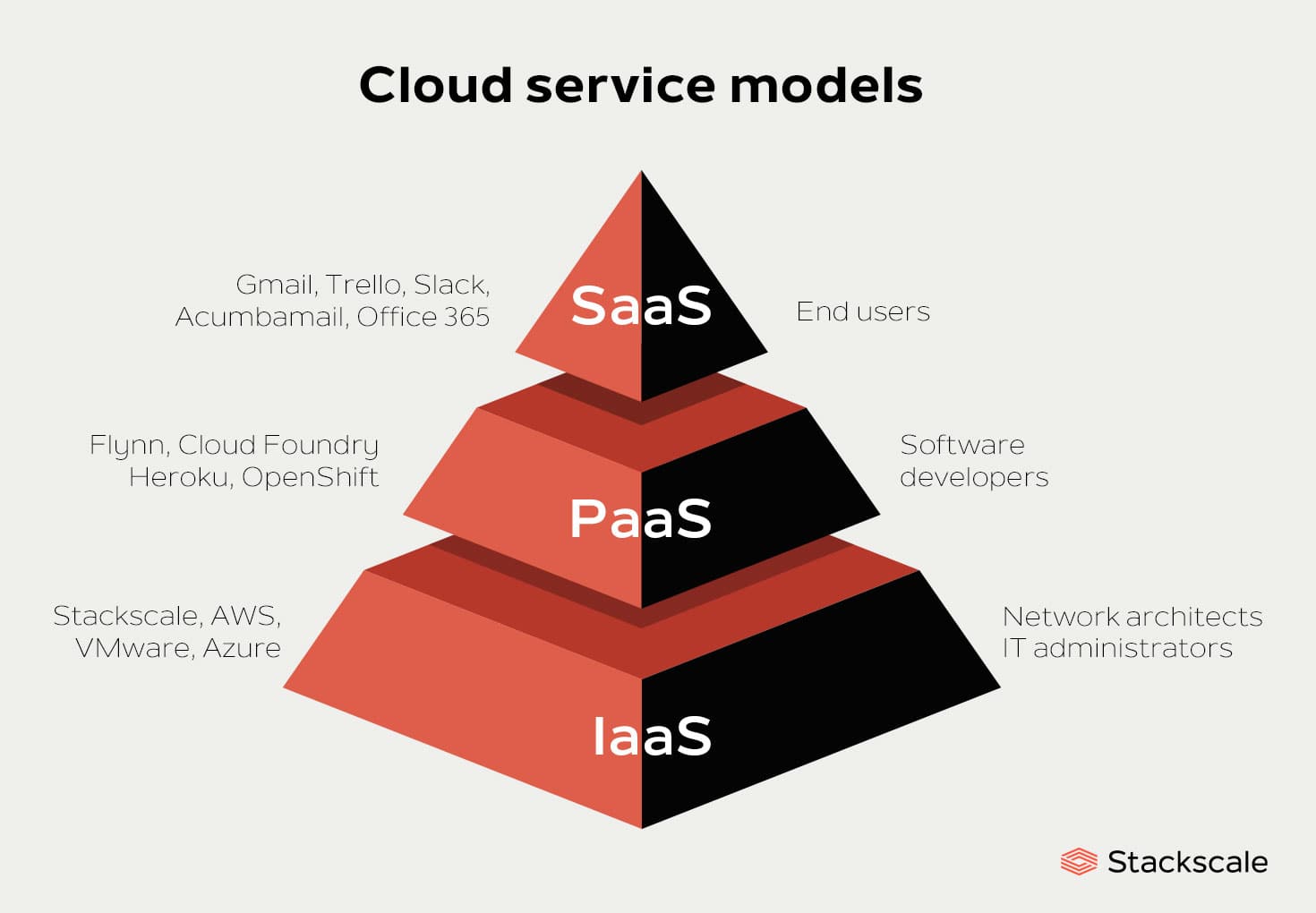
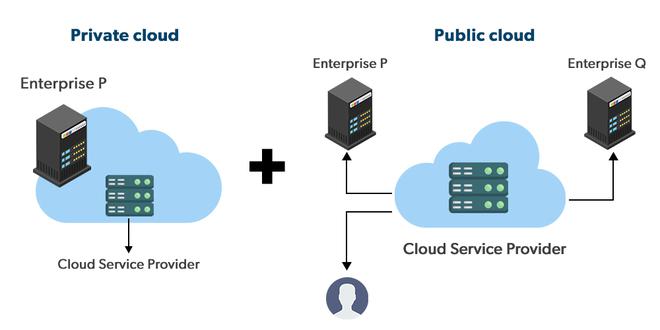
Cloud computing refers to delivering computing services such as servers, storage, databases, networking, software, and analytics over the internet (“the cloud”). Instead of owning and maintaining physical hardware, businesses rent these resources on demand from cloud providers like AWS, Microsoft Azure, and Google Cloud Platform (GCP).


Why Cloud Computing Skills Are in High Demand

One of the biggest reasons learning cloud computing helps your career is market demand. Companies are rapidly migrating from traditional on-premise systems to cloud-based infrastructure because it is cost-effective, flexible, and scalable. As a result, employers are actively looking for professionals who understand cloud technologies.

Cloud skills are required in:

  • IT services and consulting companies

  • Product-based tech firms

  • Startups and SaaS companies

  • Banking, healthcare, and e-commerce industries

This widespread adoption ensures long-term career stability.


Career Opportunities in Cloud Computing

Learning cloud computing opens the door to multiple career paths, depending on your interests and background:

  • Cloud Engineer – Designs, deploys, and manages cloud infrastructure

  • Cloud Architect – Plans cloud strategies and system architecture

  • DevOps Engineer – Integrates cloud with CI/CD pipelines and automation

  • Site Reliability Engineer (SRE) – Ensures system reliability and scalability

  • Cloud Security Engineer – Focuses on securing cloud environments

These roles are not limited to one industry, which makes cloud computing a versatile career choice.


Salary and Career Growth Benefits

Cloud computing professionals often earn higher-than-average salaries because of the specialized skill set involved. As organizations continue their digital transformation journeys, experienced cloud professionals move quickly into senior, lead, or architect-level positions.

Certifications from major cloud providers such as AWS, Azure, and GCP further boost credibility and earning potential.


Cloud Computing Complements Other Skills

Another major advantage is that cloud computing blends well with other in-demand skills:

  • Web Development – Hosting and scaling web applications

  • Data Science & AI – Running data pipelines and ML models on the cloud

  • Cybersecurity – Securing cloud infrastructure and applications

  • DevOps – Automating deployments and monitoring systems

If you already have experience in development or IT, cloud computing can significantly accelerate your career growth.


Is Cloud Computing Good for Beginners?

Yes. Cloud computing is beginner-friendly, especially with the availability of:

  • Free-tier cloud accounts

  • Online labs and hands-on projects

  • Entry-level certifications

Even non-programmers can start with cloud fundamentals and gradually move toward specialized roles.


Future Scope of Cloud Computing

Cloud computing is not a passing trend. Technologies like AI, IoT, big data, and remote work systems heavily depend on cloud infrastructure. As these technologies evolve, the demand for cloud professionals will only increase.


Final Thoughts

So, does learning cloud computing help your career? Absolutely. It offers strong job demand, high salaries, diverse career paths, and long-term growth opportunities. Whether you are a student, a working professional, or someone planning a career switch, cloud computing is a skill worth investing in.

How Are Embedded Systems, IoT, and Robotics Interconnected?

Technologies like embedded systems, Internet of Things (IoT), and robotics often appear as separate domains, but in reality, they are deeply interconnected. Together, they form the backbone of modern automation, smart devices, and intelligent machines. Understanding how these fields overlap helps students and professionals see the bigger picture of how smart systems are built.


What Are Embedded Systems?

An embedded system is a specialized computer designed to perform a specific function within a larger system. Unlike general-purpose computers, embedded systems are optimized for reliability, efficiency, and real-time performance.

Common examples include:

  • Microcontrollers in washing machines

  • Engine control units in cars

  • Medical devices like heart monitors

Embedded systems consist of hardware (microcontrollers, sensors, actuators) and software (firmware, real-time operating systems).


What Is the Internet of Things (IoT)?

The Internet of Things (IoT) refers to a network of physical devices connected to the internet that can collect, send, and receive data.

https://www.elprocus.com/wp-content/uploads/2017/02/Microcontroller-Board.png?utm_source=chatgpt.com
https://bs-uploads.toptal.io/blackfish-uploads/uploaded_file/file/39332/image-1566402184774-80ed60aba9fd255bac32ecc38c477780.jpg?utm_source=chatgpt.com
https://cdn.prod.website-files.com/65f854814fd223fc3678ea53/65f854814fd223fc3678f1c0_Actuator-Applications-IMG.webp?utm_source=chatgpt.com
4

Examples of IoT applications include:

  • Smart homes and smart cities

  • Wearable health devices

  • Industrial monitoring systems

  • Smart agriculture

At the heart of every IoT device is an embedded system that processes data and controls operations.


What Is Robotics?

Robotics is the field that focuses on designing, building, and programming robots capable of performing tasks autonomously or semi-autonomously.

Robots typically include:

  • Embedded controllers (microcontrollers or processors)

  • Sensors (cameras, proximity sensors, IMUs)

  • Actuators (motors, servos)

  • Software for control, perception, and decision-making

Robotics heavily depends on embedded systems for real-time control and execution.


How Embedded Systems Connect IoT and Robotics

Embedded systems act as the core link between IoT and robotics:

  • In IoT, embedded systems gather sensor data and communicate with cloud platforms.

  • In robotics, embedded systems process sensor input and control motors in real time.

Without embedded systems, neither IoT devices nor robots could function efficiently.


IoT Enhances Robotics

IoT adds connectivity and intelligence to robots by enabling:

  • Remote monitoring and control of robots

  • Cloud-based data processing and AI integration

  • Fleet management of multiple robots in factories or warehouses

For example, warehouse robots can send performance data to cloud servers for optimization and predictive maintenance.


Robotics Brings Action to IoT

While IoT focuses on data collection and communication, robotics brings physical action to the system:

  • IoT sensors detect conditions (temperature, motion, pressure)

  • Embedded systems process the data

  • Robots act on the information (move, pick, assemble, or adjust)

This interaction is common in smart factories and industrial automation.


Real-World Applications of the Interconnection

The combination of embedded systems, IoT, and robotics powers many modern innovations:

  • Smart manufacturing (Industry 4.0)

  • Autonomous vehicles and drones

  • Healthcare robots and remote surgery

  • Smart agriculture with robotic harvesting

  • Home automation and service robots

These systems rely on seamless communication, real-time control, and intelligent decision-making.


Skills Needed to Work in These Fields

To work at the intersection of embedded systems, IoT, and robotics, one should learn:

  • Microcontrollers and embedded C/C++

  • Sensors, actuators, and hardware interfacing

  • Communication protocols (UART, SPI, I2C, MQTT)

  • Basics of networking and cloud platforms

  • Control systems and robotics fundamentals


Conclusion

Embedded systems, IoT, and robotics are not isolated technologies—they are tightly interconnected. Embedded systems form the foundation, IoT provides connectivity and data intelligence, and robotics delivers physical action. Together, they enable smart, autonomous, and efficient systems that are shaping the future of technology.

How Can One Become a Good Machine Learning Engineer?

Machine learning is at the core of many modern technologies—from recommendation systems and voice assistants to fraud detection and self-driving cars. With demand for skilled professionals rising rapidly, many aspiring technologists ask: how can one become a good machine learning engineer? The journey requires a mix of strong fundamentals, practical experience, and continuous learning.


Build a Strong Foundation in Mathematics and Statistics

Machine learning models are built on mathematical principles. To truly understand how algorithms work, you need clarity in:

  • Linear algebra (vectors, matrices, eigenvalues)

  • Probability and statistics (distributions, hypothesis testing, Bayes’ theorem)

  • Calculus (gradients, partial derivatives, optimization)

You don’t need to be a mathematician, but a solid conceptual understanding will help you debug models and improve performance.


Learn Programming with a Focus on Python

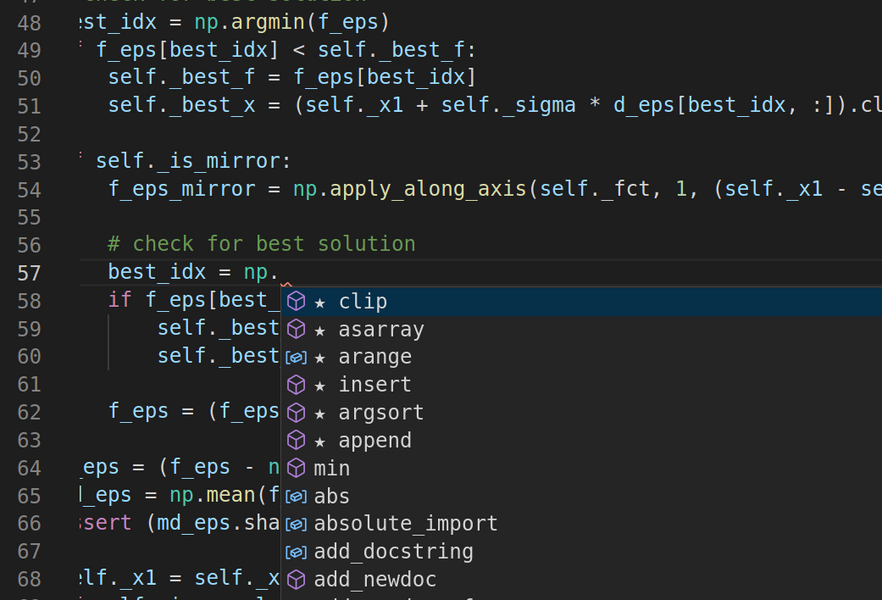
Python is the most widely used language in machine learning. It is beginner-friendly and supported by powerful libraries that simplify complex tasks.

https://news.mit.edu/sites/default/files/styles/news_article__image_gallery/public/images/202104/coding%20AI.png?itok=2gbVOckg&utm_source=chatgpt.com
https://www.boardinfinity.com/blog/content/images/2022/11/Your-paragraph-text--48-.jpg?utm_source=chatgpt.com
https://jalammar.github.io/images/pandas-intro/0%20excel-to-pandas.png?utm_source=chatgpt.com
6

Key libraries to master include:

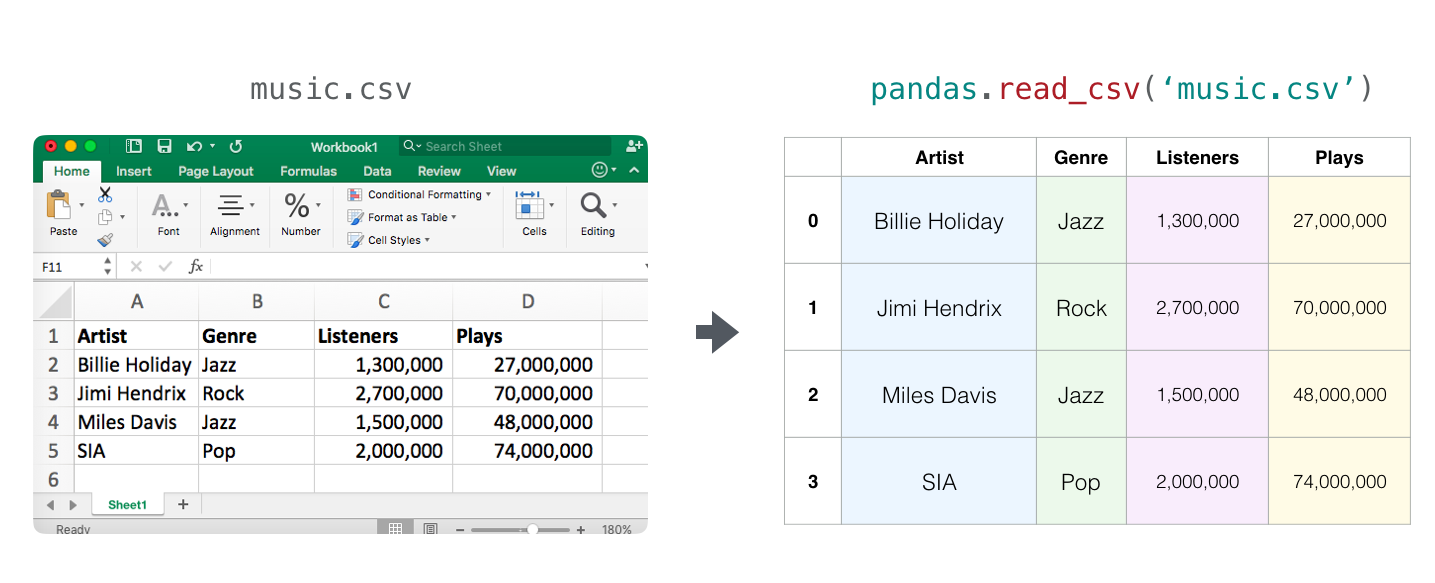
  • NumPy & Pandas for data manipulation

  • Matplotlib & Seaborn for data visualization

  • Scikit-learn for classical machine learning algorithms

  • TensorFlow & PyTorch for deep learning


Understand Core Machine Learning Algorithms

A good machine learning engineer understands not just how to use algorithms, but why they work. Focus on learning:

  • Supervised learning (linear regression, logistic regression, SVMs)

  • Unsupervised learning (k-means, hierarchical clustering, PCA)

  • Ensemble methods (random forest, gradient boosting)

  • Model evaluation techniques (cross-validation, precision, recall, ROC-AUC)

Understanding bias-variance tradeoff and overfitting is essential.


Work with Real-World Data

Real-world data is messy. To become good at machine learning, you must practice:

  • Data cleaning and preprocessing

  • Handling missing values and outliers

  • Feature engineering and selection

  • Scaling and normalization

Hands-on projects help you develop intuition that theory alone cannot provide.


Gain Experience Through Projects

Projects are the backbone of a machine learning engineer’s portfolio. Start with small projects and gradually move to complex ones, such as:

  • Predicting house prices

  • Customer churn prediction

  • Recommendation systems

  • Image or text classification

Publishing your projects on GitHub and explaining your approach in blogs or case studies can significantly boost your credibility.


Learn About Model Deployment and MLOps

Being a good machine learning engineer goes beyond building models. You should also understand how to deploy and maintain them in production:

  • Model deployment using APIs

  • Version control for models and data

  • Monitoring model performance

  • Basics of cloud platforms and MLOps tools

This skill set differentiates engineers from purely academic practitioners.


Stay Updated and Keep Learning

Machine learning is a fast-evolving field. Good engineers regularly:

  • Read research papers and technical blogs

  • Follow industry leaders and communities

  • Experiment with new frameworks and techniques

Continuous learning ensures your skills remain relevant.


Develop Problem-Solving and Communication Skills

A machine learning engineer must translate business problems into technical solutions. This requires:

  • Clear problem definition

  • Effective communication with non-technical teams

  • Ability to explain model decisions and results

Strong communication skills make you far more valuable in real-world projects.


Final Thoughts

Becoming a good machine learning engineer is a gradual process that combines theory, practice, and curiosity. By mastering fundamentals, working on real projects, learning deployment skills, and staying updated with new advancements, you can build a successful and rewarding career in machine learning.

Do you recommend Python for Data Science?

Data science has become one of the most in-demand career paths today, and one of the first questions beginners ask is: “Should I learn Python for data science?” The short answer is yes. Python is widely recommended for data science, and for good reasons. Let’s explore why Python has become the go-to language for data scientists across the world.


Why Python Is Popular in Data Science

Python is known for its simplicity and versatility. Unlike many traditional programming languages, Python reads almost like plain English, making it easier for beginners to learn while still being powerful enough for advanced analytics and machine learning tasks.

Some key reasons for Python’s popularity in data science include:

  • Easy-to-read syntax

  • Strong community support

  • A vast ecosystem of data science libraries

  • Compatibility with big data and AI tools


Popular Python libraries for data science include:

  • NumPy – Numerical computing and array operations

  • Pandas – Data cleaning, manipulation, and analysis

  • Matplotlib & Seaborn – Data visualization and plotting

  • Scikit-learn – Machine learning algorithms

  • TensorFlow & PyTorch – Deep learning and AI applications

With these tools, Python can handle everything from basic data analysis to advanced deep learning projects.


Beginner-Friendly Yet Powerful

Python is especially recommended if you are new to data science. Its simple syntax allows learners to focus more on understanding data, statistics, and problem-solving rather than struggling with complex code.

At the same time, Python scales well for professionals. It is used by data scientists working in startups, research labs, and large tech companies alike.


Strong Industry Adoption

Python is widely used in industries such as:

  • Finance and stock market analysis

  • Healthcare and bioinformatics

  • E-commerce and digital marketing analytics

  • Artificial intelligence and machine learning

  • Cybersecurity and fraud detection

Because of this widespread adoption, Python skills are highly valued by employers.


Python vs Other Languages for Data Science

While languages like R, SQL, and Java are also used in data science, Python stands out because it offers:

  • Better flexibility for end-to-end projects

  • Easier integration with web apps and production systems

  • A single language for data analysis, machine learning, and deployment

Many data scientists even combine Python with SQL or R, but Python often acts as the core language.


Career Benefits of Learning Python

If your goal is to build a career in data science, learning Python can open doors to roles such as:

  • Data Analyst

  • Data Scientist

  • Machine Learning Engineer

  • AI Engineer

Python knowledge also makes it easier to transition into related fields like AI, automation, and software development.


Final Verdict: Should You Learn Python for Data Science?

Yes, Python is highly recommended for data science. It is beginner-friendly, powerful, industry-approved, and supported by an enormous ecosystem of tools and libraries. Whether you are a student, working professional, or career switcher, Python provides a strong foundation for a successful data science journey.

How Is Artificial Intelligence Transforming eCommerce?

Artificial Intelligence (AI) is no longer a futuristic concept in eCommerce—it is already reshaping how online businesses operate and how customers shop. From personalized product recommendations to intelligent customer support, AI is helping eCommerce platforms become faster, smarter, and more customer-centric. As competition intensifies in the digital marketplace, AI has become a critical tool for growth and innovation.

Personalized Shopping Experiences

One of the most visible impacts of AI in eCommerce is personalization. AI algorithms analyze customer behavior, browsing history, purchase patterns, and preferences to deliver highly personalized experiences. Shoppers see product recommendations tailored specifically to their interests, increasing engagement and conversion rates. Platforms like Amazon and Netflix-style recommendation engines are prime examples of AI-driven personalization in action.

Smarter Product Recommendations

AI-powered recommendation systems go beyond simple “related products.” They use machine learning to predict what a customer is most likely to buy next. These systems consider multiple factors such as past purchases, time spent on product pages, and even seasonal trends. As a result, businesses can significantly boost average order value and customer satisfaction.

AI-Powered Chatbots and Customer Support

Customer service has been transformed by AI-driven chatbots and virtual assistants. These tools can handle common customer queries, track orders, process returns, and provide 24/7 support without human intervention. AI chatbots reduce response times, lower operational costs, and improve customer experience by offering instant assistance.

Visual Search and Voice Commerce

AI is also changing how customers search for products. With visual search, users can upload images to find similar products online. Voice-enabled AI assistants like Alexa and Google Assistant allow shoppers to search and shop using voice commands. These innovations make shopping more intuitive and accessible, especially for mobile users.

Dynamic Pricing and Demand Forecasting

AI enables dynamic pricing strategies by analyzing market demand, competitor pricing, and customer behavior in real time. Prices can be adjusted automatically to maximize profits while staying competitive. Additionally, AI helps with demand forecasting, allowing businesses to manage inventory more efficiently and reduce overstock or stockouts.

Fraud Detection and Secure Transactions

Security is a major concern in eCommerce, and AI plays a crucial role in fraud detection. AI systems can identify suspicious transactions by recognizing unusual patterns and behaviors. This helps businesses prevent fraud, protect customer data, and build trust with their users.

Optimized Supply Chain and Inventory Management

AI improves supply chain operations by predicting demand, optimizing logistics routes, and automating inventory management. Retailers can reduce delivery times, minimize costs, and ensure products are available when customers need them. This efficiency directly impacts customer satisfaction and brand loyalty.

Enhanced Marketing and Advertising

AI-driven marketing tools analyze customer data to create targeted advertising campaigns. From personalized email marketing to predictive ad placement, AI helps businesses reach the right audience at the right time. This leads to higher return on investment (ROI) and more effective marketing strategies.

The Future of AI in eCommerce

As AI technology continues to evolve, its role in eCommerce will only expand. Future trends include hyper-personalization, AI-generated product descriptions, advanced customer behavior prediction, and seamless omnichannel experiences. Businesses that adopt AI early will gain a competitive edge in an increasingly digital-first economy.

Conclusion

Artificial intelligence is transforming eCommerce by making online shopping smarter, faster, and more personalized. From customer support and marketing to security and supply chain management, AI is enhancing every aspect of the eCommerce ecosystem. For businesses aiming to scale and stay relevant, integrating AI is no longer optional—it is essential.

What Country Is Leading in Cyber Security?

In today’s hyper-connected world, cyber security has become a top national priority. From protecting government infrastructure to securing financial systems and personal data, countries across the globe are investing heavily in cyber defense. But one question often comes up: which country is leading in cyber security?

The answer isn’t limited to just one nation. Leadership in cyber security depends on factors such as technology, talent, policies, cyber warfare capabilities, and private-sector innovation. That said, a few countries clearly stand out.


1. United States – The Global Leader in Cyber Security

The United States is widely regarded as the world leader in cyber security.

Why the U.S. Leads

  • Home to major cyber security companies like Palo Alto Networks, CrowdStrike, Fortinet, and Cisco

  • Strong government agencies such as NSA, CISA, FBI Cyber Division

  • Advanced cyber warfare and cyber intelligence capabilities

  • Heavy investment in AI-driven cyber defense

  • World-class universities producing cyber security talent

The U.S. not only focuses on defense but also on offensive cyber operations, making it dominant in cyber power.

🔹 Best known for: Advanced research, cyber intelligence, global standards


2. Israel – The Cyber Security Innovation Hub

Despite its small size, Israel is one of the strongest cyber security nations in the world.

Why Israel Stands Out

  • Cyber security is a core part of national defense

  • Many experts come from elite military units like Unit 8200

  • High number of cyber security startups per capita

  • Strong collaboration between military, academia, and private companies

Israel is known for creating cutting-edge cyber security startups that are later acquired by global tech giants.

🔹 Best known for: Innovation, startups, cyber defense strategy


3. China – A Cyber Superpower

China is a major force in cyber security and cyber warfare.

China’s Strengths

  • Massive government investment in cyber capabilities

  • Large pool of engineers and researchers

  • Strong focus on cyber espionage and surveillance

  • Tight integration between government and tech companies

China’s approach emphasizes national control and cyber sovereignty, making it powerful but highly centralized.

🔹 Best known for: Cyber warfare, state-driven cyber programs


4. United Kingdom – Strong Policy and Cyber Defense

The UK is one of Europe’s leaders in cyber security.

Why the UK Is Important

  • National Cyber Security Centre (NCSC) is among the world’s best

  • Strong cyber laws and data protection policies

  • Thriving cyber security startup ecosystem

  • Focus on public awareness and cyber education

The UK excels in policy-making, cyber resilience, and international cooperation.

🔹 Best known for: Governance, cyber resilience, public security


5. Russia – Advanced Cyber Capabilities

Russia is widely recognized for its advanced cyber offense capabilities.

Key Strengths

  • Highly skilled hackers and researchers

  • Strong focus on cyber espionage

  • Advanced cyber attack techniques

  • Heavy involvement in cyber operations at the geopolitical level

Russia’s cyber expertise is primarily known for offensive operations rather than defensive infrastructure.

🔹 Best known for: Cyber attacks, cyber intelligence


6. India – Rapidly Emerging Cyber Security Power

India is quickly growing as a cyber security hub.

Why India Is Rising

  • Huge IT and software talent pool

  • Increasing government focus on cyber security

  • Growth in cyber security startups and training programs

  • Strong demand for cyber professionals globally

While India may not yet lead globally, it is becoming a major supplier of cyber security talent.

🔹 Best known for: Skilled workforce, cyber services, education


Global Comparison at a Glance

Country Strength Area Global Role
United States Defense & offense Global leader
Israel Innovation & startups Cyber innovation hub
China State-led cyber power Cyber superpower
UK Policy & defense Cyber governance leader
Russia Cyber offense Advanced cyber operations
India Talent & growth Emerging cyber power

So, Which Country Is Truly Leading?

🏆 Overall Leader: United States
It leads in technology, talent, infrastructure, and global influence.

🏆 Innovation Leader: Israel
Unmatched in cyber security startups and innovation.

🏆 Rising Power: India
Rapid growth and increasing global relevance.


Conclusion

There is no single definition of “leading” in cyber security.

  • If leadership means technology and global influence, the United States leads.

  • If it means innovation and startups, Israel stands out.

  • If it means future growth and talent, India is rising fast.

What Is a Good Alternative Environment to Eclipse for Android Development?

Android development has grown dramatically over the past decade, and so have the tools that support it. Back in the early days, Eclipse with Android Development Tools (ADT) was the go-to environment for building Android apps. But Eclipse has long been discontinued for Android development, and most developers today choose more modern, efficient tools.

So… what are the best alternatives to Eclipse for Android development in 2025? Let’s break them down.


✅ 1. Android Studio (The Official IDE)

Overview

Android Studio is the official IDE for Android development, maintained by Google. It replaced Eclipse ADT as the recommended platform in 2015, and since then it has become the standard for Android app creation.

Key Features

  • Built-in Android-optimized code editor

  • Fast emulator and device preview

  • Integrated Gradle build system

  • Support for Kotlin and Java

  • Layout editor with drag-and-drop UI design

  • Extensive profiling tools for performance & memory

  • Instant Run for faster testing

Why It’s Better Than Eclipse

Android Studio is tailor-made for Android. It has built-in tools that Eclipse never offered, including:

  • Better project structure

  • Advanced debugging

  • Rich UI design previews

  • Strong language support (especially Kotlin)

If you’re making Android apps today, Android Studio is the #1 choice.

🟢 Best for: Beginners, professionals, large teams
🔴 Cons: Can be heavy on system resources


✅ 2. Visual Studio Code (With Extensions)

Overview

VS Code is a lightweight and highly customizable code editor from Microsoft. On its own, it isn’t a full Android IDE — but with the right extensions, it becomes a powerful alternative.

Useful Extensions

  • Kotlin plugin

  • Java support

  • Gradle support

  • ADB Interface

  • Debugger for Android

Pros

✔ Fast and lightweight
✔ Great UI and code navigation
✔ Huge extension marketplace
✔ Works well with version control

Cons

✖ Not as fully featured as Android Studio
✖ Requires extra setup
✖ Limited UI design tools

🟢 Best for: Developers who want speed and flexibility
🔴 Not best for: Complete beginners


✅ 3. IntelliJ IDEA

Overview

Android Studio is actually based on IntelliJ IDEA (made by JetBrains). If you love IntelliJ but want a different flow or ecosystem, it’s a strong choice.

Versions

  • Community Edition (Free)

  • Ultimate Edition (Paid)

Pros

✔ Excellent code navigation
✔ Powerful smart editor tools
✔ Great support for Java & Kotlin
✔ Can be customized for mobile development

Cons

✖ Requires some configuration for Android
✖ Ultimate edition costs money

🟢 Best for: Developers who prefer a general IDE that isn’t focused only on Android


✅ 4. Flutter + VS Code or IntelliJ/Android Studio

Overview

If you’re open to cross-platform development, Flutter is a modern, popular framework from Google that lets you build both Android and iOS apps from one codebase using Dart.

Flutter developers commonly use:

  • Visual Studio Code

  • Android Studio

  • IntelliJ IDEA

Why It’s a Good Alternative

✔ Single codebase for Android & iOS
✔ Fast hot-reload testing
✔ Great community support

Cons

✖ Not pure Android — you’re using a framework
✖ Must learn Dart

🟢 Best for: Developers targeting both Android & iOS


🆚 Comparison Table
IDE / Environment Easy Setup Android-Optimized UI Tools Lightweight Best For
Android Studio ⭐⭐⭐⭐ ⭐⭐⭐⭐⭐ ⭐⭐⭐⭐ ⭐⭐ All developers
VS Code ⭐⭐⭐⭐ ⭐⭐ ⭐ ⭐⭐⭐⭐ Fast & flexible editing
IntelliJ IDEA ⭐⭐⭐ ⭐⭐⭐ ⭐⭐ ⭐⭐ Advanced smart coding
Flutter (VS Code/AS) ⭐⭐⭐⭐ ⭐⭐⭐ ⭐⭐⭐ ⭐⭐ Cross-platform dev

Final Recommendation

👉 If you want the best overall Android development tool — go with Android Studio.
It has the most complete features, integrations, and community support.

👉 If you prefer speed and flexibility — VS Code is a solid choice.
You’ll need to install a few extensions, but it becomes a capable Android editor.

👉 If you like IntelliJ’s ecosystem — try IntelliJ IDEA.

👉 If you’re building for both Android & iOS — Flutter with VS Code or Android Studio is a fantastic alternative.


Conclusion

While Eclipse was once the standard for Android development, it hasn’t kept pace with modern workflows. Today’s alternatives — especially Android Studio — provide better tooling, smarter code help, and smoother development pipelines.

✔
Form submitted! Our team will reach out to you soon.
✔
Form submitted! Our team will reach out to you soon.
0
0
Your Cart
Your cart is emptyReturn to Course